In 2006, Eben Upton, Rob Mullins, Jack Lang and Alan Mycroft from the University of Cambridge’s Computer Laboratory set out to find a solution to the increasing problem in the computing sector. At one time, many students going onto Computer Science courses at university had a reasonable level of technical skill. Since then, the number of students has fallen drastically and so has the skill level. Why is this the case? One thought is the current IT curriculum in schools simply does not teach these technical skills. One thought is that changes in technology have limited how it can be taught. Perhaps it is a combination of these and more? “Back in the day”, platforms such as the BBC Micro and Spectrum ZX made it possible for any one to program applications. Fast forward a couple of years and schools mainly have windows PCs. While this was by no means a huge obstacle, it did start to mark the end of programming. Skip forward a few more years to when the Raspberry Pi project started, the average programming being done in schools was a bit of VB in Office. Even then, in some cases this was minimal, if happening at all. While useful, writing some macros or a single tiny program is not enough to encourage kids into software development as a career. It limited the creativity of some and completely put off others. The ones who were interested, found their own way into the area. For some this meant doing what owners of BBC Micros etc did and writing full applications of their own, for others it meant web development.
While writing this, the web comic below showed up in a feed. It turns out it is awfully relevant.
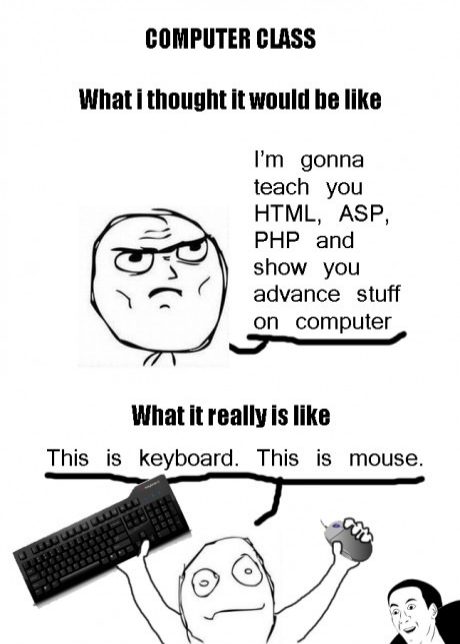
Here is where the Raspberry Pi came into being. The decline in skills and students was recognised and a solution was needed. The answer that resulted was a low cost (Cost, as always, being a huge factor in any solution) platform that could be a used as a teaching tool, not just for the obvious computer applications, but also for more physical projects. So here it was, a cheap tool, a whole $35 worth, that had similar power to a low power netbook/smart phone with similar features, yet also had the capabilities to be used for physical computing like an Arduino.
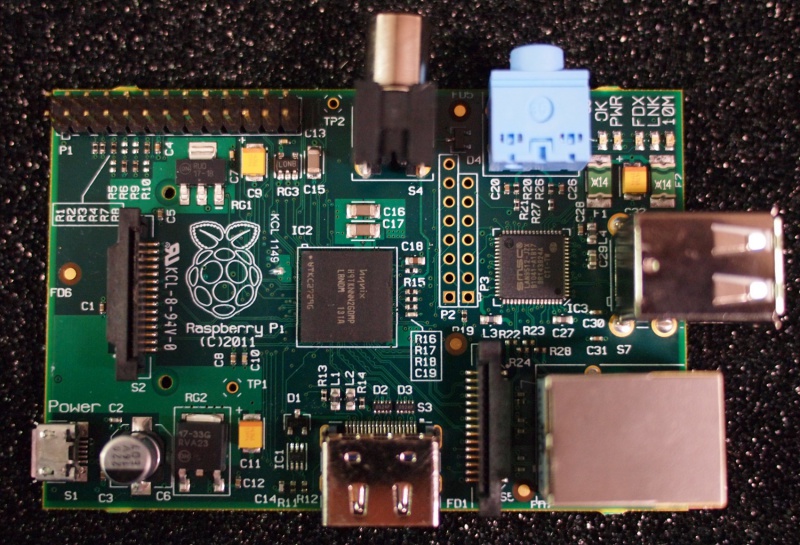
Rasberry Pi Beta Board
After working on the project since 2006, hype began to build. Soon enough, the board was famous, everyone wanted one, then in February 2012, it was time. The team started sending out the message through all their previous communication methods. Emails were sent, blogs posted, tweets sent, and I assume shouting from the rooftops (Or at least crying into their tea on launch day when it became obvious just what they had achieved). Now, here is where it starts to annoy me. Let me rephrase that, here is where the community starts to annoy me. Don’t get me wrong, the vast majority of the community saw this coming and are taking it in their stride, there is a minority however (Isn’t there always when it comes to the internet…) that are only willing to see this as a disaster. Almost as if they had kicked a puppy*. Now this is what annoys me, you have been paying attention, you know how popular it has been and know it is going to be popular, yet still knowing this, you try to tear the team a new one. I don’t see any logic in this. It is a well established fact that the device in question has been developed by a a small group of volunteers and not a huge corporation. This means they have a fairly limited budget to work with (Again, an assumption based on the lack company information available), and as a result do not have the resources to magically produce enough boards for everyone in a realistic time scale. We cannot forget of course who this project was aimed at, educators and their classes. This gives the group two choices, delay the project another year while they produce enough boards to meet demand and reduce the amount of time developers have to produce the software users would need to get started, or release now and get the product to market faster so developers have time to prepare for September.
On an international basis, the September deadline is not a particularly important one (To my knowledge), but in the UK, it is a concern. In 2011, Ofsted (Office for Standards in Education, Children’s Services and Skills) release a report on ICT in schools saying ICT in schools needed improvement, particularly in programming and a couple of other areas 2. As a result of this consultation, it was announced that the current ICT curriculum would be scrapped and replaced with a Computer Science focused course 3. While this may not have been part of the original plan for Raspberry Pi, it almost certainly gave them a new target. What better time to release a product that promotes computer science than when a new computer science curriculum is being released?
Whatever the reason for releasing now, it was known that the demand would be huge. As a result of this, they made efforts to give everyone a chance to get one of the first 10,000; a reasonable release time (Near impossible to find a time everyone is happy with), distributors that cover the world, different methods of alerting everyone. If the efforts by Raspberry Pi themselves wasn’t enough, there was certainly enough buzz on social networks. As shown by the release (and the prompt crashing of several websites), the launch was not missed. Quite how some didn’t notice is quite amazing. Granted, the announcement was not explicit, but given the prior hints at when the release was likely to be, the hints in the announcement itself, and the discussion, it was clear enough to know it was going to be big. And what is going to be bigger than a release?
So, my response to the people complaining about how it wasn’t publicised is this, “Tough.”. Move on, do something useful with your time, such as perhaps, oh I don’t know, write some software for it and test it on an emulator? For those complaining that 10,000 wasn’t enough for a first release. Um…ok, I take it you haven’t tried to predict the future to see how many you will need? Ignoring the time scale, there is the matter of funding. Creating a huge first batch would be rather expensive, a bit beyond the means of such a group. Not impossible, just difficult and a whole new barrel of fish. For those complaining that the team is in over their heads. Yes they are, and no they are not. This project has turned out bigger than anyone could have predicted. Given the scale, the group is in my opinion coping rather well. I challenge any of you to do better with only volunteers and jobs to do.
TL;DR
Raspberry Pi is an amazing board created to help solve the lack of skilled computer science students. It is a project run by volunteers working with the community. If for some reason you do not like what they are doing, either get involved with useful advice or start your own project. Or simply be quiet. Yes there will be some disappointments along the road, yes it may take a while for you to get your own, but please, do not complain and complain some more about someone doing a fine job under difficult circumstances. Do not waste your energy complaining about how badly someone is handling something that a corporation can struggle with never mind a small group of people. Instead, regardless of where you are, put your energy into helping the next generation of computer scientists, engineers, mathematicians, scientists (Or anyone else who falls into the category of STEM). A little bit of effort and we can do something amazing. Hop to it.
*No puppies were ever harmed, only stroked and petted and found to be amazing. Presumably cats were also found to be amazing, but I’ll leave that one to the Raspberry Pi team to confirm or deny.
